(This project is still a work-in-progress.)
Tracking battery manufacturing has been a long journey. I deeply appreciate all the support and feedback that have helped move this data platform forward. But it’s time for a change.
I want to create a framework that empowers anyone to effortlessly design and build their own data studios and workflows—all at their fingertips.
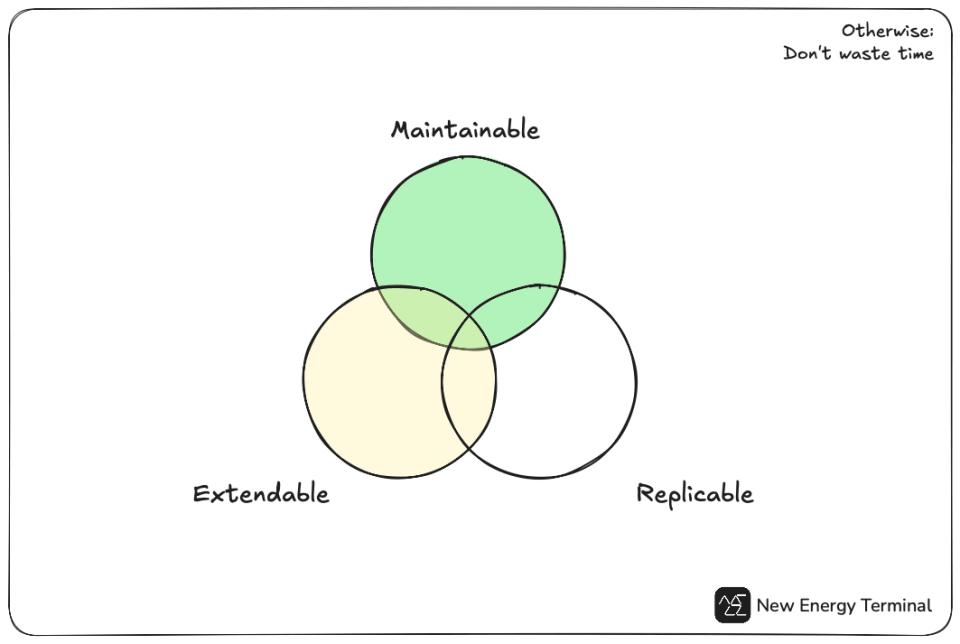
Since launching New Energy Terminal in mid-2022, I’ve rewritten both the admin and public pages almost every six months—starting from scratch and gradually transitioning towards a decoupled architecture.
We’ve also steadily refined how we handle data—from writing specialized raw database queries to developing reusable, generic database functions.
This led me to wonder:
- It makes no sense to work on a project that is hard to maintain, extend, and replicate.
- Can we create a universal, all-purpose solution for managing datasets?
Instead of developing specialized admin tools for datasets like battery manufacturing or renewable energy, why not build a versatile platform that works with any dataset? - Can we integrate core BI features into data management?
I’d love to maintain a clear separation between admin pages (for data management) and public pages (for data analysis accessible to unauthorized users). However, integrating BI features into data management could provide instant feedback whenever data updates—essentially, a real-time dashboard.
In short: make data management as flexible as building BI dashboards.
Database GUIs, dashboards, but not both
Data management and BI (business intelligence) are two different concepts. The former deals with low-level data structures and operations, while the latter focuses on high-level use cases.
BI often gains more attention because it directly serves end users, making it easier to generate business insights or create content.
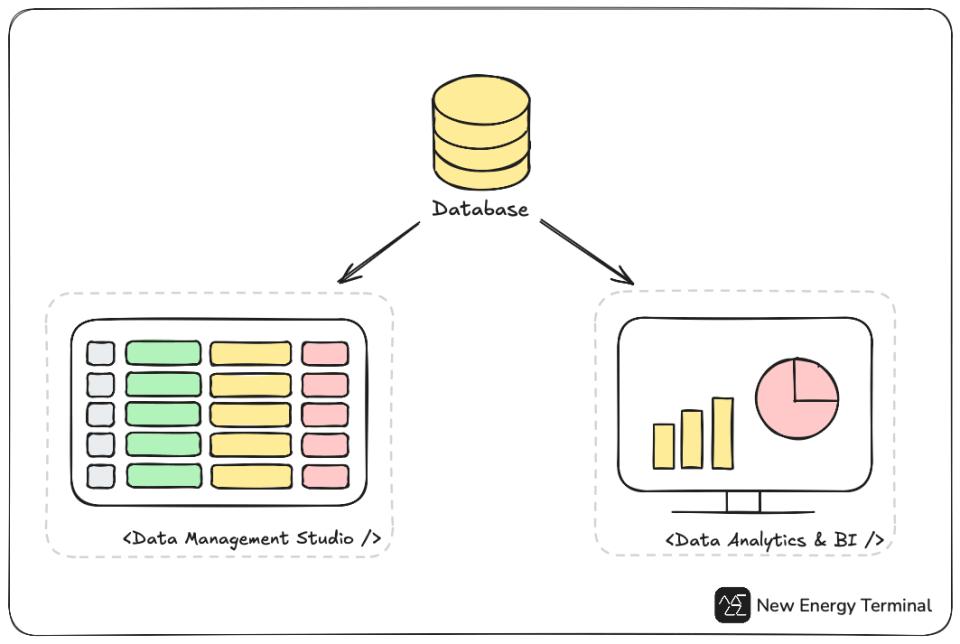
The simplicity of BI GUIs
BI tools are designed to be flexible and user-friendly, even for those with limited database knowledge. Tools like Tableau, Qlik, and Power BI—or Fanruan and vividemi BI in China—make it simple to create beautiful and reusable dashboard templates.
The complexity of data management GUIs
Data management tools, however, often lack the same ease of use. Transitioning from spreadsheets to databases means trading the simplicity of a two-dimensional view for a mindset that treats data as objects in a multidimensional space. Managing data becomes more intuitive when we can work with it in its natural, object-like form.
There are many database GUIs like DBeaver and MySQL Workbench. Some ORMs, such as Prisma and Drizzle Studio, offer GUIs as well, and platforms like Supabase include database studios as part of their BaaS offering.
However, these tools are typically designed for generic use cases. In practice, we often end up building customized UIs to provide a smoother user experience and incorporate proprietary business logic.
The missing link: reusability and integration
Few tools offer the flexibility and reusability necessary for effective data management, and even fewer integrate BI functionalities. I’ve come across Retool, which is impressive, but as a closed-source platform, it comes with the risk of vendor lock-in.
In general, data management and BI remain separate markets. Bridging this gap with a lightweight yet powerful tool could enhance transparency, facilitate real-time feedback, and empower users to adapt dynamically to changes.
My vision
I envision a framework that enables users to fully customize data schemas and effortlessly build their own data studios and workflows at their fingertips. Special thanks to PayloadCMS for the inspiration!
Despite the marketing hype and advanced feature claims around data management and BI tools, they fundamentally:
- Operate as CRUD applications.
- Leverage ORMs to communicate with databases.
- Rely heavily on APIs to abstract processes, such as using AI agents for ETL tasks (Extract, Transform, Load).
Let’s dive into some technical discussions.
Most apps are fundamentally CRUD operations
Consider posting on social media: you create a post, read it later, fix a typo, and perhaps delete it after someone comments. Congratulations—you’ve just performed all four CRUD operations: Create, Read, Update, and Delete.
CRUD systems are everywhere. Every content management platform provides templates for starting a blog or an e-commerce shop, all built on these basic operations.
Data management and BI (business intelligence) are no exceptions. A unified platform should seamlessly incorporate both.
- Data management involves all four CRUD operations: onboarding, maintaining, and redesigning databases to consistently align with business needs and strategies.
- BI is primarily focused on “Read.” Its main goal is to identify patterns and inconsistencies in business operations over time through data analytics, delivering timely feedback to authorized stakeholders.
We create visual representations of data—called dashboards—and integrate business models into the analysis. This approach enhances insight generation, decision-making, business transparency, and workflow optimization.
An example of the process
Take data management as an example:
→ Onboard data based on business needs.
→ Create an MVP dashboard to validate those needs.
→ Optimize the workflow.
→ Refine the database schema design.
In return, a robust BI feedback system depends on good data management. They complement each other, forming a cohesive loop.
CRUD, data management, and BI
As you can see, data management and BI are fundamentally CRUD applications. A unified platform could essentially function as a backend template, leveraging modern ORMs (object-relational mapping) to bridge the two seamlessly.
Data management and BI both leverage ORM
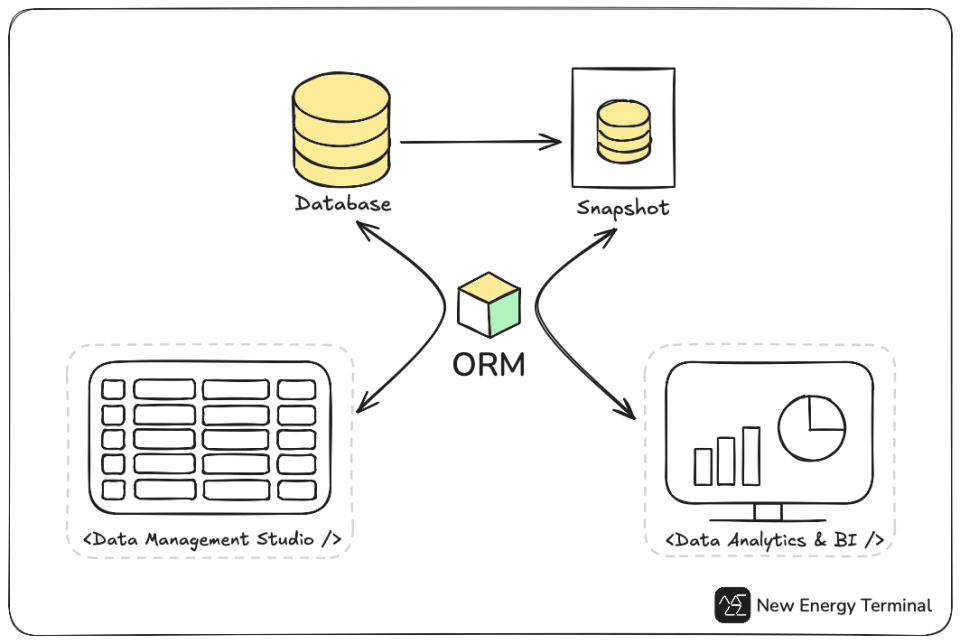
Instead of writing raw queries manually, the ORM layer acts as a translator between the database and the application. It sanitizes and reorganizes inputs into raw queries, making applications more secure and flexible.
Frameworks like Laravel (PHP) and Django (Python) come with built-in ORM capabilities, while languages like JavaScript can leverage tools such as Prisma and Drizzle ORM.
How BI tools leverage ORM
BI tools are typically cloud-based SaaS applications. They create snapshots of your database, queries, or raw files (e.g., Excel) and store the results in the cloud for authorized users. Once a snapshot is created, you work with it instead of the original data.
For instance:
- Tableau generates snapshots known as workbooks.
- Qlik Sense allows you to join multiple tables from your original data sources into a single snapshot.
These tools then use ORM to translate analysis components and user inputs into database queries. The retrieved data populates charts and dashboards.
A shared foundation
As you can see, both data management and BI benefit significantly from ORM. In fact, they might even share the same schema if the snapshot structure mirrors the original database design.
This raises an important question: Does this mean we can directly integrate them into a single platform?
Challenges of such integration
Challenge one
When building a generic data management GUI, users should have the flexibility to opt-out hard-coding database schemas. For instance, they should be able to construct a schema using drag-and-drop functionality. But where should we store this configuration information?
One possible solution is to store the configurations in a file-based database like SQLite, which is highly versatile and easy to work with.
Challenge two
How do we ensure isolation among different snapshots? In real-world scenarios, it’s common to work with data from multiple sources and, additionally, to create more than one snapshot.
A similar approach could be applied using SQLite. Each snapshot could be stored in its own SQLite file, providing physical isolation between snapshots.
There are definitely more challenges as we progress…
The above discussions are not meant to criticize any existing data tools. Actually I gained deeper understanding of data science while exploring them, and I highly encourage you to try them as well. I just feel it’s a bit cumbersome to work with so many apps and can’t help but wonder if there’s a one-size-fits-all solution.
That being said, these are just very early-stage thoughts, but I wanted to write them down as a reference. Battery data will serve as the pilot dataset for testing. If you’re interested in this tool, feel free to reach out!
Thank you!